
Fix a silent MIDI controller
November 2026 · minotor.org editors
If Minotor opens but a knob or button does nothing, check the route from the physical control to its assigned role. The useful questions are: which input port received the message, what kind of message was it, and which channel and control number did it carry?
This walkthrough is based on the upstream source at commit 9251ecf, checked in November 2026. It is a troubleshooting procedure derived from the code, not a claim that we tested a particular controller on current hardware. For tempo synchronisation, use the separate Ableton MIDI Clock guide.

Check one control all the way through
- Choose one knob or button. Leave the other controls alone while observing its messages.
- Inspect the sender. In a MIDI monitor, record the input-port name, message type, displayed channel, number and value. Use the controller manufacturer's documentation to change its sending mode if needed.
- Find that port in Minotor. In File, Configuration (F10), open the MIDI interfaces tab and check the assigned mapping.
- Match the mapping to the sender. A similarly named device preset is useful only when the device sends the messages that preset expects.
- Watch the software preview. If the intended control changes there, investigate physical LED output separately.
Write the observation down as a small record, for example “controller USB input, channel 1, CC 7, values from 0 to 127”. That record is more useful than “the fader sends MIDI”. If the device sends notes instead, record a note number and what arrives on both press and release.
Notes, CC messages and clock are separate paths
| Message observed | What to investigate | Why a different test can mislead |
|---|---|---|
| Control Change (CC) | CC acceptance and the control or trigger assigned to that number and channel | A working keyboard note does not establish a matching CC assignment |
| Note On / Note Off | Note acceptance and the mapped note trigger | The note number can equal a CC number while identifying a different event |
| MIDI Clock | Clock acceptance and the timing setup | A moving tempo indicator does not prove a fader has a control role |
In midiinterface.cpp, note events and CC events pass through separate acceptance flags. Clock has its own handling. In midimapper.cpp, a mapping entry distinguishes type 0 (Control Change) from type 1 (Note), then looks at the channel and number. A matching numeric value alone therefore does not establish a matching assignment.
Watch the channel numbering
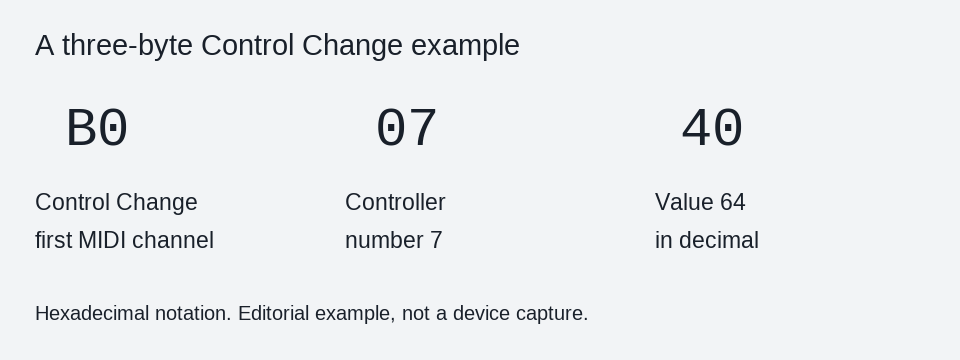
The input parser extracts the low four bits of a channel-message status byte. That gives an internal channel value from 0 to 15. Many controller displays and MIDI monitors show channels from 1 to 16 instead. When comparing a log or a saved mapping with a monitor, establish which convention each uses.
As a worked decoding example, the three bytes B0 07 40 describe a Control Change on the first MIDI channel, controller number 7, value 64. The 0 in B0 is the zero-based channel nibble; 40 is hexadecimal 64. If the sender changes to channel 2, the first byte becomes B1, while the control number can stay 7.
Change one side deliberately. If you alter both the device's channel and its mapping at the same time, you lose the chance to see which mismatch caused the problem. Keep a copy of the original mapping before editing.
What the bundled mappings tell you
The repository includes mappings named generic_piano.mcf, korg_nanoKontrol.mcf and korg_nanoKontrol2.mcf. They are presets for those layouts. The nanoKONTROL2 file declares eight tracks, two knobs per track and three triggers per track. That describes a control layout, not automatic compatibility with every eight-fader device.
The mapping loader reads properties using Qt's INI-format settings. Its map field contains a serialized QVariant, so a raw text editor is an awkward place to change assignments. Prefer the application's mapping editor, save a separate copy and test the result. A rename of the product field cannot translate messages from a different controller.
Where to stop and change the diagnosis
- No message in the monitor: investigate the controller, USB connection, driver or selected port before changing Minotor roles.
- A message in the monitor, no matching Minotor action: compare the interface, acceptance setting, type, channel, number and assigned role.
- The preview responds, the matrix stays dark: follow the output and hardware path. The architecture page separates software animation from matrix output.
- A button behaves differently on release: record both events, including their values, before assuming it is a toggle.
When asking for help, include the operating system, the Minotor commit or patch used, the controller model, the selected input port and one observed message. Send a minimal mapping with private machine paths removed if the issue follows that mapping. A clear five-line report is easier to reproduce than a video of several controls moving at once.
Source files checked
Reviewed in November 2026: MIDI input parser and acceptance flags, mapping lookup and loading, mapping file serialization, and the bundled presets. The repository is the upstream software project; this site is an independent archive.